OGX ❤️ Claude Code

· 2 min read

Claude Code is an AI coding tool developed and maintained by Anthropic. It has become an industry leader for AI coding assistance and allows users to create plans, manage agents, develop their own custom skills, and more.

Today we are happy to announce ogx connect support for Claude Code, allowing OGX users to launch Claude Code directly and access models on their OGX server. Our configuration allows the use of a single model for all tasks as well as custom mappings of up to three models for differing tasks.

Using OGX as your backend for Claude Code can provide some strong advantages over different backend options:

  • Control your budget by offering a mixture of different models from different sources, rather than relying on a single backend provider
  • Take advantage of Claude Code's mapping of models to seemlessly switch between self-hosted and SaaS options with no server interactions required
  • Ensure redundancy by never being reliant on one SaaS backend, always keeping Claude Code running for users of your OGX server

In this blog I am going to share how to start running Claude Code using models on an OGX server, using a remote server that has both self-hosted and SaaS models enabled.

The blog assumes you already have the OGX server up and running on a remote host - see our Getting Started guide to learn more.

Download Claude Code

Our first step here is to actually download and install Claude Code. You can see all the downloading options from the Claude Code website but generally the below curl command is suifficient in most cases.

curl -fsSL https://claude.ai/install.sh | bash

Use Claude Code with OGX

As mentioned before, this blog assumes an OGX server is already running at myremoteserver.com:8321 - in this case, we are also making the following assumptions:

  • The remote::vllm provider is enabled, serving the Qwen/Qwen3-8B model
  • The remote::gemini provider is enabled, with the gemini-2.5-pro model available
  • The remote::openai provider is enabled, with the gpt-4o model available
  • No authentication has been added

You can verify what models your OGX server has available with curl http://myremoteserver.com:8321/v1/models

Now comes the easy part - run this simple command below to start up Claude Code with your specific models:

ogx connect claude \
--haiku-model vllm/Qwen/Qwen3-8B \
--sonnet-model gemini/models/gemini-2.5-pro \
--opus-model openai/gpt-4o \
--url http://myremoteserver.com:8321/v1

You should be greeted by a Claude Code TUI that looks something like this:
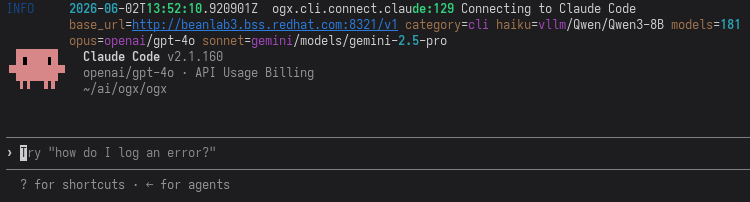
Claude Code Home

Running /model should show the models you've selected as they were configured:
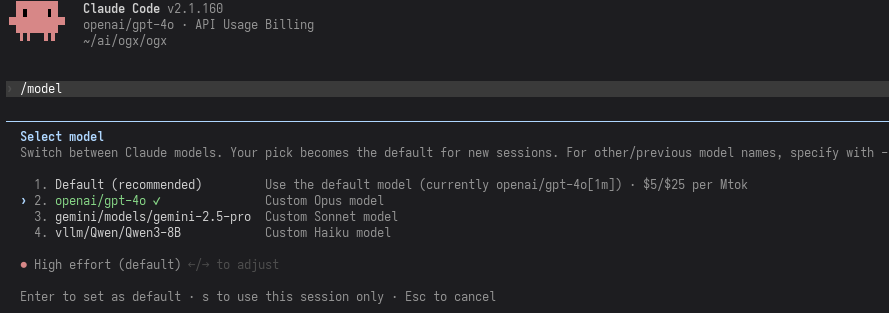
Claude Code Models

Using Claude Code with Any Model via OGX

· 4 min read
Sébastien Han
OGX Core Team
Charlie Doern
OGX Core Team

Claude Code is one of the best coding assistants available. But what if you want to use it with GPT-4o, Qwen, Llama, or a model running on your own hardware? OGX makes that possible. A single command connects Claude Code to your OGX server, auto-discovers your models, and maps them to Claude's haiku/sonnet/opus tiers.

This post walks through the setup, explains how the translation works under the hood, and shows how to configure multi-provider routing so different Claude Code model tiers hit different backends.

Use Amazon Bedrock with OGX Without Managing Bearer Tokens

· 4 min read

OGX now signs Bedrock requests with standard AWS SigV4, so the server uses the same credential chain your platform already runs. No bearer tokens to manage, no custom auth plumbing in your application code.

If your team uses IAM roles, IRSA, or STS for Bedrock access, this means OGX fits into your existing AWS identity model without extra moving parts. Apps talk to one OpenAI-compatible API while OGX handles the provider-specific auth behind the scenes.

For the implementation details, see issue #4730 and PR #5388.

OGX RAG Benchmarks: Open-Source Retrieval That Outperforms OpenAI

· 4 min read

We benchmarked OGX's RAG pipeline against OpenAI's file search across four BEIR retrieval datasets, MultiHOP RAG, and Doc2Dial. The results: OGX hybrid search beats OpenAI on 3 of 4 BEIR datasets, with up to 29.6% higher nDCG@10 on argument retrieval. Pair it with Gemma 31B and you get end-to-end RAG that exceeds GPT-4.1 by 81% on multi-hop reasoning, all running on your own infrastructure.

This isn't a synthetic demo. These are standard academic benchmarks, measured end-to-end through the same OpenAI-compatible APIs you'd use in production.

Use Codex CLI with Any Model Through OGX

· 3 min read
Sébastien Han
OGX Core Team

OpenAI's Codex CLI is a terminal-native coding agent. It reads your codebase, proposes changes, runs commands, and iterates, all from your shell. The problem: it only talks to OpenAI's API.

OGX fixes that. By placing OGX between Codex and your inference provider, you get Codex's coding workflows with any model OGX supports: Llama via Ollama, Claude via Bedrock, Mistral via vLLM, or OpenAI itself with conversation compaction on top.

This post walks through setup, configuration, and what to expect from this alpha integration.

OGX 1.0: The Open Agentic API Server is Production-Ready

· 5 min read
OGX Team
Core Team

Two weeks ago, we told you the name changed. Today, we're telling you it's done.

OGX 1.0 is a server that replaces the OpenAI API with something you own. Point your existing OpenAI, Anthropic, or Google SDK at it. Run any model on any infrastructure. Get server-side agentic orchestration, built-in RAG, MCP tool integration, multi-tenancy, and production observability out of the box. No vendor lock-in. No code changes.

This is not a beta. This is not "production-ready with caveats." This is v1.

Every Protocol. Every Framework. Zero Code Changes.

· 4 min read
Sébastien Han
OGX Core Team

Agents shouldn't change a line of code to run on your infrastructure.

That sentence sounds simple, but it represents a fundamental shift in how enterprises can adopt AI agents. Today, every agentic framework speaks a different protocol. Teams using Claude Agents talk Anthropic Messages. Teams using ADK talk Google Interactions. Most agents still call OpenAI Chat Completions or the newer Responses API. Each choice creates a hard dependency on a vendor's infrastructure, SDK, and API contract.

OGX exists to break that coupling. It's a server that speaks every major agentic protocol natively, translating them to any model running on any infrastructure. No vendor lock-in. No SDK rewrites.

OGX ❤️ OpenCode

· 2 min read

OpenCode is an open source AI coding agent that helps you write code in your terminal, IDE, or desktop. It is a popular open source alternative for tools like Claude Code and Codex.

OpenCode has a concept of providers that is similar to OGX's inference providers - they are a local or cloud-based model inference endpoint that expose an LLM for OpenCode to utilize. This is similar but does differ from OGX providers which are inclusive of inference but also include providers for vector stores, safety backends, tool runtimes, etc.

OGX as a OpenCode provider has some strong advantages over providers that offer only inference:

  • Unified API for tools + RAG + storage
  • Multiple providers behind one endpoint
  • Built-in orchestration layer

In this blog I am going to share how to start running OpenCode with OGX as a provider, using OpenCode's custom provider feature.

The blog assumes you already have an OGX server up and running - see our Getting Started guide to learn more.

Download OpenCode

Downloading OpenCode is simple and can be done in various ways. You can see a full list of methods here but generally the below curl command is suifficient in most cases.

curl -fsSL https://opencode.ai/install | bash

Configure OGX as a provider for OpenCode

As mentioned before, this blog assumes an OGX server is already running at localhost:8321 - in this case, we are also making the following assumptions:

  • The remote::vllm provider is enabled, serving the Qwen/Qwen3-8B model
  • The remote::watsonx provider is enabled, with the gpt-oss-120b model available
  • No authentication has been added

You can verify what models your OGX server has available with curl http://localhost:8321/v1/models

We can now configure OpenCode to use our OGX server via a custom provider.

Create a file ~/.config/opencode/opencode.json with the following content:

{
"$schema": "https://opencode.ai/config.json",
"provider": {
"ogx": {
"npm": "@ai-sdk/openai-compatible",
"name": "OGX",
"options": {
"baseURL": "http://localhost:8321/v1"
},
"models": {
"vllm-inference/Qwen/Qwen3-8B": {
"name": "Qwen3-8B"
},
"watsonx/openai/gpt-oss-120b": {
"name": "gpt-oss-120b"
}
}
}
}
}

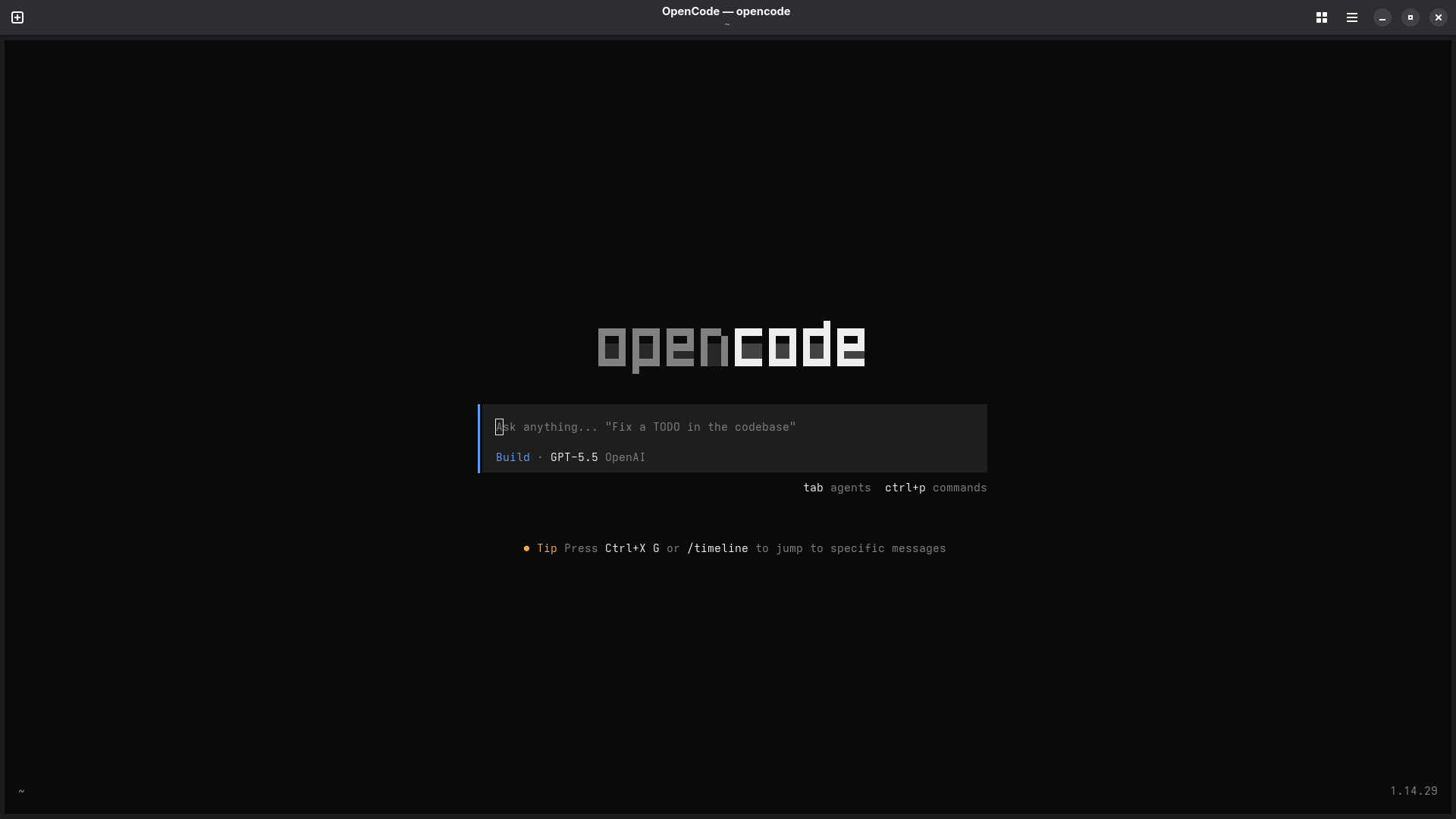
Once the file is created, start OpenCode - it should look something like this:

OpenCode Home

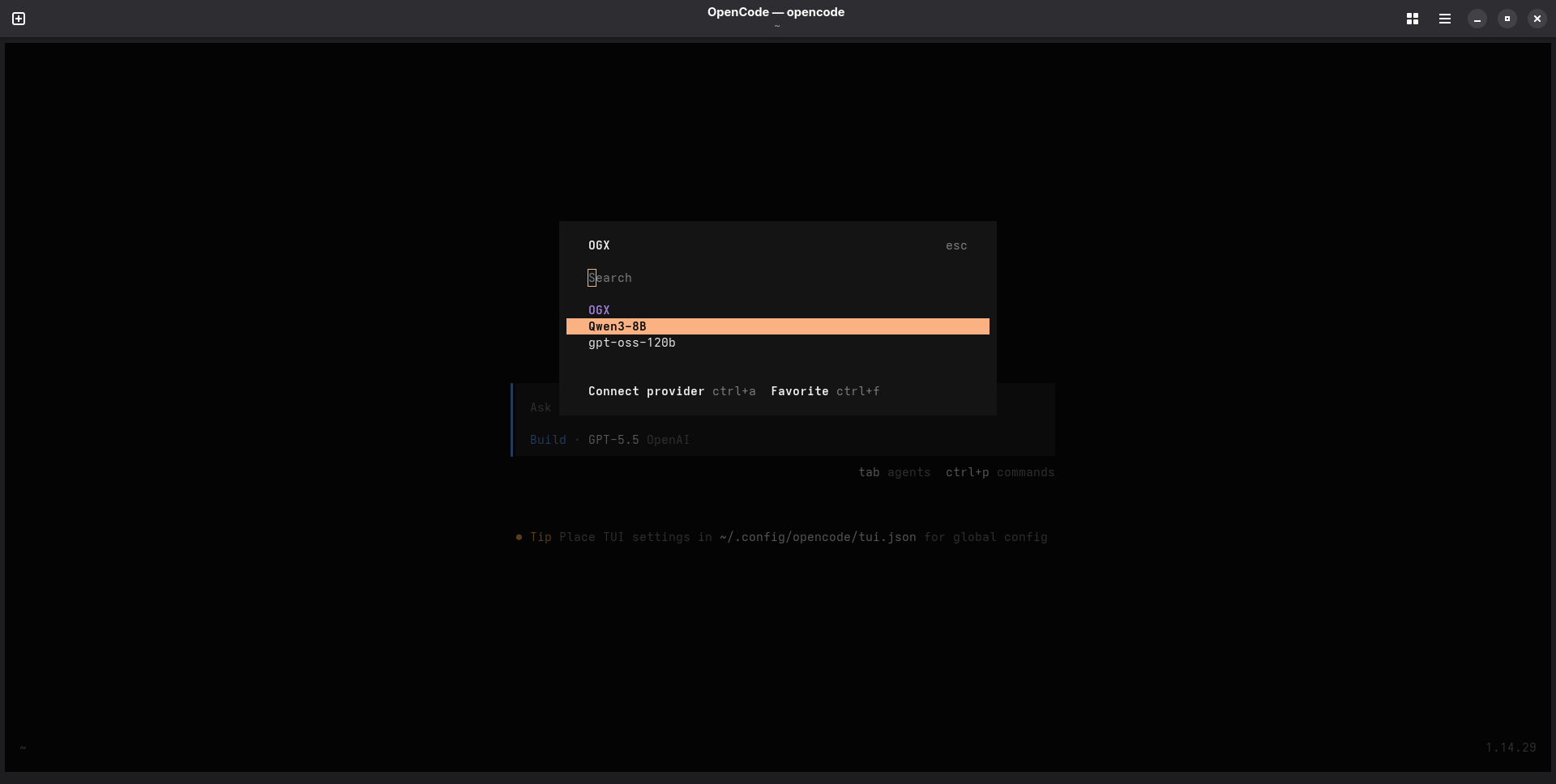
Run /connect in the TUI. If you search OGX the provider should come up with our two models listed.

OpenCode Models

Select gpt-oss-120b and hit enter. If you are prompted for an API key, you can just put None since we haven't configured one in this case.

Use OpenCode with OGX

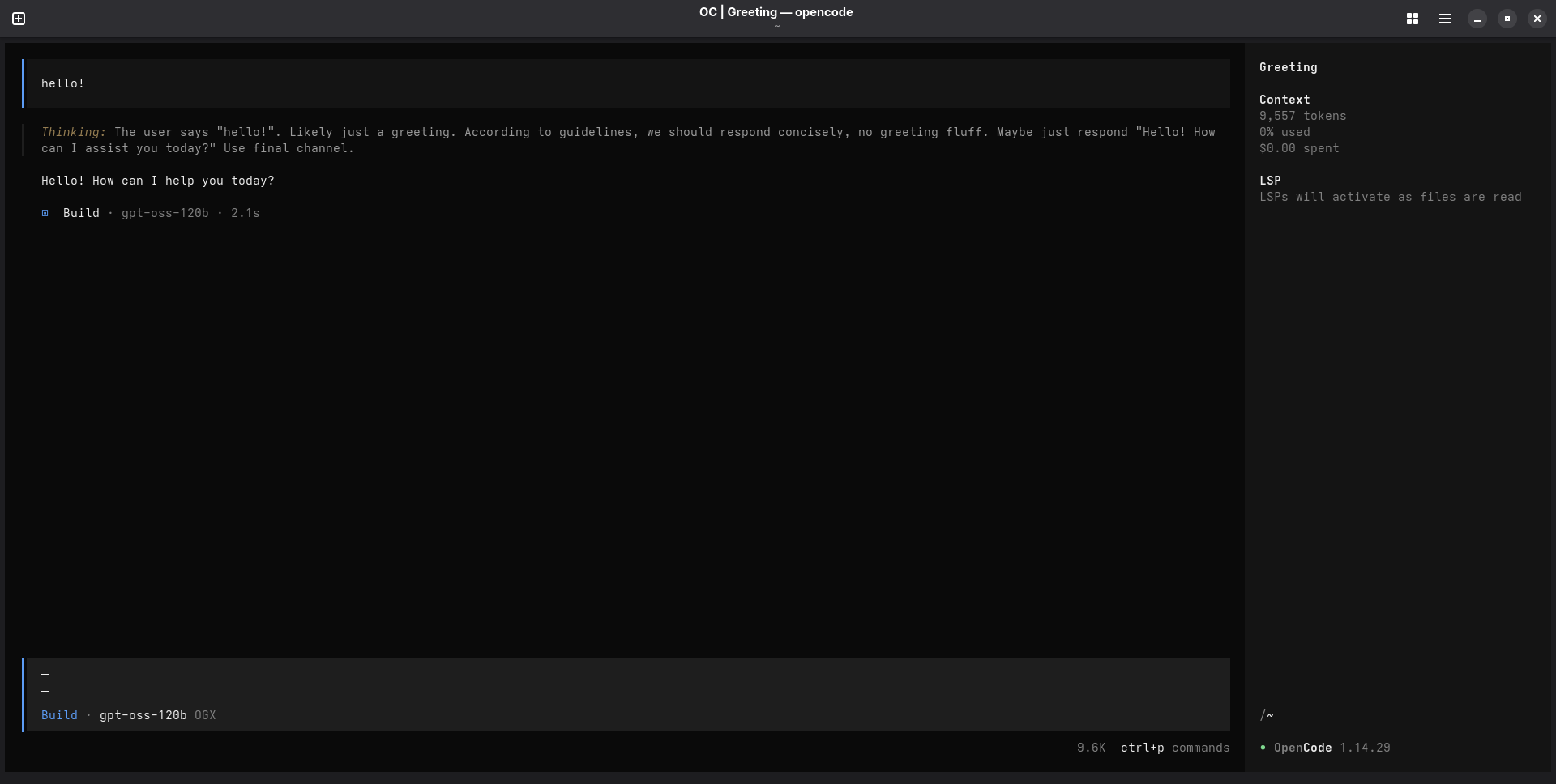
Now that you have your OGX-provided model selected, it's time to start using OpenCode with OGX! Go ahead and start prompting in the TUI - it should look something like this:

OpenCode User

And that is it! You can tweak your OGX server and OpenCode custom provider configuration to add additional providers, models, and whatever else you might need for yourself or your enterprise.

Thanks for reading, and happy coding!

From Llama Stack to OGX: A New Name, A Sharper Mission

· 5 min read
OGX Team
Core Team

Llama Stack is now OGX. The name changed, but more importantly, so did the mission.

When this project started, it was an API standardization effort — a set of specs for building AI applications, anchored to the Llama model family. That framing attracted contributors and integrations, but it also created confusion about what the project actually is. People thought it was a spec. Or a Llama-only thing. Or another framework.

It's none of those. OGX is a server. Specifically, it's a server-side agentic loop that speaks the native API of every major frontier lab — OpenAI, Anthropic, and Google — so your application code doesn't have to care which one you're using.

This post explains why we renamed, what changed in the project's direction, and what that means for you.

Tracing OGX Applications with MLflow: SDK vs OTel Collector

· 6 min read

As LLM-powered applications grow in complexity, observability becomes essential. You need to understand what your application is doing — what prompts are being sent, what responses come back, how long each call takes, and how many tokens are consumed. MLflow provides a powerful tracing framework that captures all of this, which can be integrated with ogx for observability.

In this post, we'll walk through two approaches for exporting OGX traces into MLflow:

  1. MLflow SDK — Direct instrumentation using MLflow's built-in tracing and autologging
  2. OTel Collector — Decoupled telemetry pipeline using OpenTelemetry auto-instrumentation and an OTel Collector as the intermediary

By the end, you'll understand when to use each approach and how to set them up.