The OGX Python SDK Has a New Foundation
· 2 min read

Starting with ogx_client 1.1.4, the Python SDK is built on a new code generation backend. The package name and API surface stay the same — most codebases need only an import path change.
Starting with ogx_client 1.1.4, the Python SDK is built on a new code generation backend. The package name and API surface stay the same — most codebases need only an import path change.

Codex CLI brings an agent into the terminal, but teams often want that agent to use more than one model source. OGX gives Codex one OpenAI-compatible connection to local models, hosted models, and secured deployments.
With ogx connect codex, you can launch Codex against the models exposed by a running OGX server without hand-editing your normal Codex configuration. OGX discovers the available models, writes a temporary Codex session home, forwards auth and provider data when needed, and starts Codex with a session that points at OGX.
This post walks through the command, the generated Codex profile, and a local-first path with Ollama and vLLM. The result is a small but useful workflow: Codex gets a familiar Responses API endpoint, and teams keep model access, auth, and provider choice in OGX instead of hard-coding those details into every developer tool.

AI agents that call tools, search documents, and reason over multiple turns are powerful, but they also need boundaries. A model that can execute a web search or query your internal knowledge base should not be free to produce harmful content along the way.
OGX implements guardrails as a first-class feature of the Responses API. Unlike bolt-on moderation that checks content after the fact, OGX validates content at two critical points inside the agentic loop: before inference starts and while user-visible text and reasoning output streams. This post explains exactly how that works, why the design choices matter, and how to use it in practice.

Claude Code is an AI coding tool developed and maintained by Anthropic. It has become an industry leader for AI coding assistance and allows users to create plans, manage agents, develop their own custom skills, and more.
Today we are happy to announce ogx connect support for Claude Code, allowing OGX users to launch Claude Code directly and access models on their OGX server. Our configuration allows the use of a single model for all tasks as well as custom mappings of up to three models for differing tasks.
Using OGX as your backend for Claude Code can provide some strong advantages over different backend options:
In this blog I am going to share how to start running Claude Code using models on an OGX server, using a remote server that has both self-hosted and SaaS models enabled.
The blog assumes you already have the OGX server up and running on a remote host - see our Getting Started guide to learn more.
Our first step here is to actually download and install Claude Code. You can see all the downloading options from the Claude Code website but generally the below curl command is suifficient in most cases.
curl -fsSL https://claude.ai/install.sh | bash
As mentioned before, this blog assumes an OGX server is already running at myremoteserver.com:8321 - in this case, we are also making the following assumptions:
remote::vllm provider is enabled, serving the Qwen/Qwen3-8B modelremote::gemini provider is enabled, with the gemini-2.5-pro model availableremote::openai provider is enabled, with the gpt-4o model availableYou can verify what models your OGX server has available with curl http://myremoteserver.com:8321/v1/models
Now comes the easy part - run this simple command below to start up Claude Code with your specific models:
ogx connect claude \
  --haiku-model vllm/Qwen/Qwen3-8B \
  --sonnet-model gemini/models/gemini-2.5-pro \
  --opus-model openai/gpt-4o \
  --url http://myremoteserver.com:8321/v1
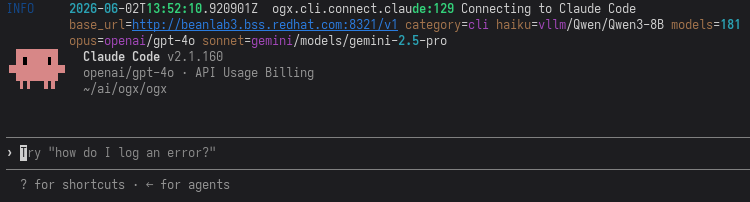
You should be greeted by a Claude Code TUI that looks something like this:
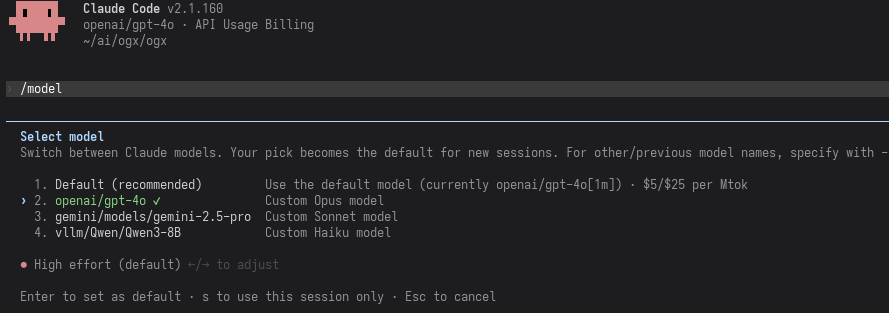
Running /model should show the models you've selected as they were configured:

Claude Code is one of the best coding assistants available. But what if you want to use it with GPT-4o, Qwen, Llama, or a model running on your own hardware? OGX makes that possible. A single command connects Claude Code to your OGX server, auto-discovers your models, and maps them to Claude's haiku/sonnet/opus tiers.
This post walks through the setup, explains how the translation works under the hood, and shows how to configure multi-provider routing so different Claude Code model tiers hit different backends.
OGX now signs Bedrock requests with standard AWS SigV4, so the server uses the same credential chain your platform already runs. No bearer tokens to manage, no custom auth plumbing in your application code.
If your team uses IAM roles, IRSA, or STS for Bedrock access, this means OGX fits into your existing AWS identity model without extra moving parts. Apps talk to one OpenAI-compatible API while OGX handles the provider-specific auth behind the scenes.
For the implementation details, see issue #4730 and PR #5388.

We benchmarked OGX's RAG pipeline against OpenAI's file search across four BEIR retrieval datasets, MultiHOP RAG, and Doc2Dial. The results: OGX hybrid search beats OpenAI on 3 of 4 BEIR datasets, with up to 29.6% higher nDCG@10 on argument retrieval. With contextual chunking (gpt-4.1-mini), OGX now wins on all 4 datasets — closing the fiqa gap with a +65% improvement. Pair it with Gemma 31B and you get end-to-end RAG that exceeds GPT-4.1 by 81% on multi-hop reasoning, all running on your own infrastructure.
This isn't a synthetic demo. These are standard academic benchmarks, measured end-to-end through the same OpenAI-compatible APIs you'd use in production.
OpenAI's Codex CLI is a terminal-native coding agent. It reads your codebase, proposes changes, runs commands, and iterates, all from your shell. The problem: it only talks to OpenAI's API.
OGX fixes that. By placing OGX between Codex and your inference provider, you get Codex's coding workflows with any model OGX supports: Llama via Ollama, Claude via Bedrock, Mistral via vLLM, or OpenAI itself with conversation compaction on top.
This post walks through setup, configuration, and what to expect from this alpha integration.
Two weeks ago, we told you the name changed. Today, we're telling you it's done.
OGX 1.0 is a server that replaces the OpenAI API with something you own. Point your existing OpenAI, Anthropic, or Google SDK at it. Run any model on any infrastructure. Get server-side agentic orchestration, built-in RAG, MCP tool integration, multi-tenancy, and production observability out of the box. No vendor lock-in. No code changes.
This is not a beta. This is not "production-ready with caveats." This is v1.
Agents shouldn't change a line of code to run on your infrastructure.
That sentence sounds simple, but it represents a fundamental shift in how enterprises can adopt AI agents. Today, every agentic framework speaks a different protocol. Teams using Claude Agents talk Anthropic Messages. Teams using ADK talk Google Interactions. Most agents still call OpenAI Chat Completions or the newer Responses API. Each choice creates a hard dependency on a vendor's infrastructure, SDK, and API contract.
OGX exists to break that coupling. It's a server that speaks every major agentic protocol natively, translating them to any model running on any infrastructure. No vendor lock-in. No SDK rewrites.